
这是一篇如何在UE的ProjectSettings或EditorPreferences添加设置
自定义项目设置的方式有两种。
1.继承UObject;
2.继承UDeveloperSettings;这个用起来更方便
UDeveloperSettings方法
添加DeveloperSettings模块
在创建C++类时选择全部类型,选择继承UDeveloperSettings
UCLASS中的config字段是配置文件的分类,可以用一个自定义的字符XXX。会在saved/config文件夹生成对应的XXX.ini文件,如果加上ProjectUserConfig会在Config/UserXXX.ini
UCLASS(Config=MyEditor,ProjectUserConfig)
class STANDALONTEST_API UMyUtilitySettings : public UDeveloperSettings
需要进行配置的参数需要用UPROPERTY(config,EditAnywhere)标记
属性一般标记:
UPROPERTY(config, EditAnywhere, Category = "分类" ,meta = (DisplayName = "别名"))
怎么使用这里面的数据呢?
两种方式:
const UZHDeveloperSettings* Setting = GetDefault<UZHDeveloperSettings>();
//因为是const的缘故,所以只能在代码中获取不能修改(可能有修改方式只是不知道)

UZHDeveloperSettings* Setting = GetMutableDefault<UZHDeveloperSettings>();
//GetMutableDefault() 是GetDefault()的可修改版本。(这不就知道了)
动态绑定修改事件
如果想要在项目设置中修改了某个属性值后立即做出响应,怎么做呢?
UDeveloperSettings类提供了一个返回委托的函数,利用这个就能做到

下面就是一个完整的绑定方式:

继承UObject方法
添加Settings模块
需要继承UObject类,使用ISettingsModule接口在该模块的StartupModule()函数进行注册
UCLASS(Config=MyEditor,ProjectUserConfig)
class STANDALONTEST_API UMyUtilitySettings : public UObject
//StandalonTest.cpp

#include "StandalonTest.h"

#include "ISettingsModule.h"
#include "MyUtilitySettings.h"


static const FName StandalonTestTabName("StandalonTest");

#define LOCTEXT_NAMESPACE "FStandalonTestModule"

void FStandalonTestModule::StartupModule()
{
	RegisterSettings();
	// ...
}

void FStandalonTestModule::ShutdownModule()
{
	if (UObjectInitialized())
	{
		UnregisterSettings();
	}
	//...
}

void FStandalonTestModule::RegisterSettings()
{
	if (ISettingsModule* SettingsModule = FModuleManager::GetModulePtr<ISettingsModule>("Settings"))
	{
		SettingsModule->RegisterSettings("Project", "Plugins", "MyUtilitySettings",
			LOCTEXT("MyUtilityEditorSettingsName", "My Utility Settings"),
			LOCTEXT("MyUtilityEditorSettingsDescription", "Configure the MyUtility plugin"),
			GetMutableDefault<UMyUtilitySettings>()
		);
	}
}

void FStandalonTestModule::UnregisterSettings()
{
	if (ISettingsModule* SettingsModule = FModuleManager::GetModulePtr<ISettingsModule>("Settings"))
	{
		SettingsModule->UnregisterSettings("Project", "Plugins", "MyUtilitySettings");
	}
}

#undef LOCTEXT_NAMESPACE

IMPLEMENT_MODULE(FStandalonTestModule, StandalonTest)
同样的,要配置的参数也要用UPROPERTY(config,EditAnywhere)标记
怎么使用这里面的数据呢?
获取参数的方式和UDeveloperSettings是一样的方法GetDefault或者GetMutableDefault
Container、Category、Section
先找到ISettingsModule.h文件
//ISettingsModule.h文件

class ISettingsContainer;
class ISettingsSection;
class ISettingsViewer;
class SWidget;
SettingsModule.h文件中一开始就引用了4个类,后面的两个先不管,后面再说。
三个词的含义:
Container:容器 对应class ISettingsContainer
这个类是由引擎进行“保护”管理的,在Launcher版引擎中无法自定义添加容器。那么引擎给我们提供了几种容器呢?
两种:“Editor”“Project”
乍一看有点眼熟的感觉,这两个代表的就是UE的项目设置和编辑器偏好设置,这两个容器是在ISettingsModule的StartUpModule函数进行创建的。
Container:容器
//SettingsModule.cpp

virtual void StartupModule() override
{
	TSharedRef<FSettingsContainer> EditorSettingsContainer =  FindOrAddContainer("Editor");
	EditorSettingsContainer->Describe(LOCTEXT("EditorPreferencesSubMenuLabel", "Editor  Preferences"), LOCTEXT("EditorPreferencesSubMenuToolTip", "Configure the behavior  and features of this Editor"), NAME_None);
	EditorSettingsContainer->DescribeCategory("General",  LOCTEXT("EditorGeneralCategoryName", "General"), LOCTEXT("EditorGeneralCategoryDescription", "General Editor settings description  text here"));
	EditorSettingsContainer->DescribeCategory("LevelEditor",  LOCTEXT("EditorLevelEditorCategoryName", "Level Editor"), LOCTEXT("EditorLevelEditorCategoryDescription", "Level Editor settings description  text here"));
	EditorSettingsContainer->DescribeCategory("ContentEditors",  LOCTEXT("EditorContentEditorsCategoryName", "Content Editors"), LOCTEXT("EditorContentEditorsCategoryDescription", "Content editors settings  description text here"));
	EditorSettingsContainer->DescribeCategory("Plugins",  LOCTEXT("EditorPluginsCategoryName", "Plugins"), LOCTEXT("EditorPluginsCategoryDescription", "Plugins settings description text  here"));
	EditorSettingsContainer->DescribeCategory("Advanced",  LOCTEXT("EditorAdvancedCategoryName", "Advanced"), LOCTEXT("EditorAdvancedCategoryDescription", "Advanced editor settings"));
//... ...
TSharedRef<FSettingsContainer> ProjectSettingsContainer =  FindOrAddContainer("Project");
//... ...
}
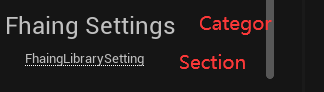
Category分类、Section部件
动态绑定修改事件
TSharedPtr<ISettingsSection> SettingS;
SettingS =  FModuleManager::LoadModuleChecked<ISettingsModule>("Settings").RegisterSettings("Project","Plugins",
            TEXT("UE4EditorCustomize"), FText::FromString("UE4 EditorCustomize"),
            FText::FromString("Setting For UE4EditorCustomize"),  GetMutableDefault<UEditorCustomizeSetting>());
SettingS->OnModified().BindRaw(this,  &FUE4EditorCustomizeModule::OnSettingModified);
//这个例子的主要问题就是怎么获取到ISettingsSection的,在通过ISettingsSection进行绑定。